PiHole
Ajouter une exception à DHCP dans pihole
Étant donné que pihole utilise dnsmasq comme serveur DNS et DHCP, on peut mettre en place une exception afin que DHCP ne fournisse pas une adresse IP à une adresse MAC en particulier.
Cela peut être utile pour la TV d'Orange par exemple qui a besoin que ce soit le DHCP de la box et uniquement de la box qui lui fournisse son adresse IP.
Pour cela, il faudra éditer le fichier /etc/dnsmasq.d/02-pihole-dhcp.conf et ajouter à la fin:
dhcp-host=64:FD:96:0C:A2:58,ignore
Copié de ce site: https://www.reddit.com/r/pihole/comments/ob886b/comment/h3m5ogw/
Afin d'éviter que la configuration soit réécrite par Pihole, on peut créer un fichier à part: dans /etc/dnsmasq.d/05-ignore-tv-orange.conf
Pihole avec un DNS recursif (unbound)
We will use unbound, a secure open-source recursive DNS server primarily developed by NLnet Labs, VeriSign Inc., Nominet, and Kirei. The first thing you need to do is to install the recursive DNS resolver:
sudo apt install unbound
If you are installing unbound from a package manager, it should install the root.hints file automatically with the dependency dns-root-data. The root hints will then be automatically updated by your package manager.
Optional: Download the current root hints file (the list of primary root servers which are serving the domain "." - the root domain). Update it roughly every six months. Note that this file changes infrequently. This is only necessary if you are not installing unbound from a package manager. If you do this optional step, you will need to uncomment the root-hints: configuration line in the suggested config file.
wget https://www.internic.net/domain/named.root -qO- | sudo tee /var/lib/unbound/root.hints
Configure unbound¶ Highlights:
Listen only for queries from the local Pi-hole installation (on port 5335) Listen for both UDP and TCP requests Verify DNSSEC signatures, discarding BOGUS domains
Apply a few security and privacy tricks
/etc/unbound/unbound.conf.d/pi-hole.conf:
server:
    # If no logfile is specified, syslog is used
    # logfile: "/var/log/unbound/unbound.log"
    verbosity: 0

    interface: 127.0.0.1
    port: 5335
    do-ip4: yes
    do-udp: yes
    do-tcp: yes

    # May be set to yes if you have IPv6 connectivity
    do-ip6: no

    # You want to leave this to no unless you have *native* IPv6. With 6to4 and
    # Terredo tunnels your web browser should favor IPv4 for the same reasons
    prefer-ip6: no

    # Use this only when you downloaded the list of primary root servers!
    # If you use the default dns-root-data package, unbound will find it automatically
    #root-hints: "/var/lib/unbound/root.hints"

    # Trust glue only if it is within the server's authority
    harden-glue: yes

    # Require DNSSEC data for trust-anchored zones, if such data is absent, the zone becomes BOGUS
    harden-dnssec-stripped: yes

    # Don't use Capitalization randomization as it known to cause DNSSEC issues sometimes
    # see https://discourse.pi-hole.net/t/unbound-stubby-or-dnscrypt-proxy/9378 for further details
    use-caps-for-id: no

    # Reduce EDNS reassembly buffer size.
    # IP fragmentation is unreliable on the Internet today, and can cause
    # transmission failures when large DNS messages are sent via UDP. Even
    # when fragmentation does work, it may not be secure; it is theoretically
    # possible to spoof parts of a fragmented DNS message, without easy
    # detection at the receiving end. Recently, there was an excellent study
    # >>> Defragmenting DNS - Determining the optimal maximum UDP response size for DNS <<<
    # by Axel Koolhaas, and Tjeerd Slokker (https://indico.dns-oarc.net/event/36/contributions/776/)
    # in collaboration with NLnet Labs explored DNS using real world data from the
    # the RIPE Atlas probes and the researchers suggested different values for
    # IPv4 and IPv6 and in different scenarios. They advise that servers should
    # be configured to limit DNS messages sent over UDP to a size that will not
    # trigger fragmentation on typical network links. DNS servers can switch
    # from UDP to TCP when a DNS response is too big to fit in this limited
    # buffer size. This value has also been suggested in DNS Flag Day 2020.
    edns-buffer-size: 1232

    # Perform prefetching of close to expired message cache entries
    # This only applies to domains that have been frequently queried
    prefetch: yes

    # One thread should be sufficient, can be increased on beefy machines. In reality for most users running on small networks or on a single machine, it should be unnecessary to seek performance enhancement by increasing num-threads above 1.
    num-threads: 1

    # Ensure kernel buffer is large enough to not lose messages in traffic spikes
    so-rcvbuf: 1m

    # Ensure privacy of local IP ranges
    private-address: 192.168.0.0/16
    private-address: 169.254.0.0/16
    private-address: 172.16.0.0/12
    private-address: 10.0.0.0/8
    private-address: fd00::/8
    private-address: fe80::/10
Start your local recursive server and test that it's operational:
sudo service unbound restart
dig pi-hole.net @127.0.0.1 -p 5335
The first query may be quite slow, but subsequent queries, also to other domains under the same TLD, should be fairly quick.
You should also consider adding
edns-packet-max=1232 to a config file like /etc/dnsmasq.d/99-edns.conf to signal FTL to adhere to this limit.
Test validation¶¶
You can test DNSSEC validation using
dig fail01.dnssec.works @127.0.0.1 -p 5335
dig dnssec.works @127.0.0.1 -p 5335
The first command should give a status report of SERVFAIL and no IP address. The second should give NOERROR plus an IP address.
Configure Pi-hole¶ Finally, configure Pi-hole to use your recursive DNS server by specifying 127.0.0.1#5335 as the Custom DNS (IPv4):
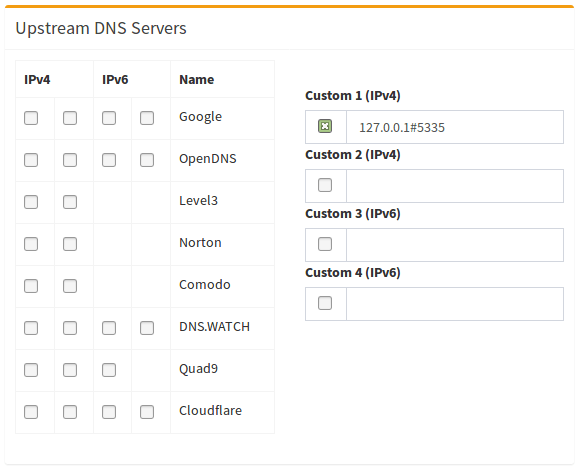
(don't forget to hit Return or click on Save)
Disable resolvconf.conf entry for unbound (Required for Debian Bullseye+ releases)
Debian Bullseye+ releases auto-install a package called openresolv with a certain configuration that will cause unexpected behaviour for pihole and unbound. The effect is that the unbound-resolvconf.service instructs resolvconf to write unbound's own DNS service at nameserver 127.0.0.1 , but without the 5335 port, into the file /etc/resolv.conf. That /etc/resolv.conf file is used by local services/processes to determine DNS servers configured. You need to edit the configuration file and disable the service to work-around the misconfiguration.
- Step 1 - Disable the Service
To check if this service is enabled for your distribution, run below one. It will show either active or inactive or it might not even be installed resulting in a could not be found message:
systemctl is-active unbound-resolvconf.service
To disable the service, run the statement below:
sudo systemctl disable --now unbound-resolvconf.service
-
Step 2 - Disable the file resolvconf_resolvers.conf¶ Disable the file resolvconf_resolvers.conf from being generated when resolvconf is invoked elsewhere.
sudo sed -Ei 's/^unbound_conf=/#unbound_conf=/' /etc/resolvconf.conf sudo rm /etc/unbound/unbound.conf.d/resolvconf_resolvers.conf Restart unbound.
sudo service unbound restart
Add logging to unbound
Warning !!!!
It's not recommended to increase verbosity for daily use, as unbound logs a lot. But it might be helpful for debugging purposes.
There are five levels of verbosity
Level 0 means no verbosity, only errors Level 1 gives operational information Level 2 gives detailed operational information Level 3 gives query level information Level 4 gives algorithm level information Level 5 logs client identification for cache misses
First, specify the log file, human-readable timestamps and the verbosity level in the server part of /etc/unbound/unbound.conf.d/pi-hole.conf:
server:
    # If no logfile is specified, syslog is used
    logfile: "/var/log/unbound/unbound.log"
    log-time-ascii: yes
    verbosity: 1
Second, create log dir and file, set permissions:
sudo mkdir -p /var/log/unbound
sudo touch /var/log/unbound/unbound.log
sudo chown unbound /var/log/unbound/unbound.log
On modern Debian/Ubuntu-based Linux systems, you'll also have to add an AppArmor exception for this new file so unbound can write into it.
Create (or edit if existing) the file /etc/apparmor.d/local/usr.sbin.unbound and append
/var/log/unbound/unbound.log rw,
to the end (make sure this value is the same as above). Then reload AppArmor using
sudo apparmor_parser -r /etc/apparmor.d/usr.sbin.unbound

sudo service apparmor restart
Lastly, restart unbound:
sudo service unbound restart
Uninstall unbound
To remove unbound from your system run
sudo apt remove unbound
Make sure to switch to another upstream DNS server for Pi-hole.
Copié de ce site: https://docs.pi-hole.net/guides/dns/unbound/